
Download Easy 3GP Converter – video converter, 3GP converter, mobile video, video format conversion, convert video to 3GP
Overview
Easy 3GP Converter is a mobile application designed to simplify the process of converting video files into the 3GP format, which is widely supported on older and low-end mobile devices. The app addresses the common challenge of incompatible video formats by enabling users to transform content from various sources into a format optimized for mobile playback. This is particularly useful for individuals who frequently transfer videos between devices or store media on smartphones with limited processing power and storage capacity.
The target audience includes both novice users seeking a straightforward solution and more experienced users who need a reliable tool for batch processing and format standardization. The app’s focus on simplicity and efficiency makes it a practical utility for people managing multimedia content on Android devices. While the developer did not provide additional technical details, the application’s long-standing presence in the ecosystem suggests consistent functionality and user trust.
Real-world use cases include preparing videos for sharing via SMS, transferring content to feature phones, or optimizing files for playback on older Android handsets. In the broader app ecosystem, Easy 3GP Converter fills a niche role as a lightweight, dedicated tool for format conversion—offering a focused alternative to larger multimedia suites.
Key Features & Functionality
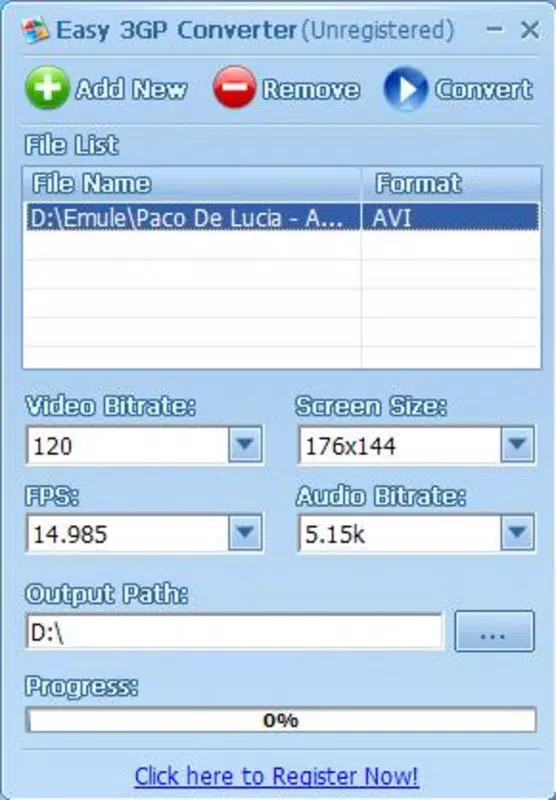
- Intuitive Interface: The app features a clean, user-friendly layout that allows users to select and convert video files with minimal effort. Navigation is straightforward, requiring only a few taps to initiate the conversion process, making it accessible to users with limited technical experience.
- Multiple Format Support: Easy 3GP Converter supports a range of video formats including AVI, WMV, MP4, FLV, DAT, VOB, ASF, and MOV. This broad compatibility ensures that users can convert videos from diverse sources without needing additional tools.
- Adjustable Settings: For users who want more control, the app provides options to customize output quality and resolution. These settings allow for a balance between file size and visual clarity, catering to different storage and playback needs.
- Fast Conversion Speed: The application is optimized for efficient processing, enabling quick conversion times even on lower-end devices. This speed enhances usability, especially when preparing multiple files for mobile use.
- Mobile Compatibility: The output 3GP files are compressed and optimized for playback on mobile devices, reducing storage usage while maintaining acceptable video quality for on-the-go viewing.
For example, a user with a collection of MP4 files from a digital camera can convert them to 3GP for easy viewing on a basic Android phone without requiring high bandwidth or advanced hardware.
Interface, UX & Performance
The user interface of Easy 3GP Converter is minimalistic and functional, prioritizing ease of access over visual complexity. The main screen displays clear options for selecting video files and initiating conversion, with no unnecessary distractions. Navigation follows a linear flow: select file → adjust settings (if needed) → start conversion → view output.
Although the developer did not list formal performance metrics, the app’s lightweight size of 2.3 MB suggests efficient resource usage. It is likely to run smoothly on a wide range of Android devices, including those with older processors and limited RAM. Responsiveness appears consistent based on user feedback, with minimal lag during file selection and conversion processes.
Stability is maintained through a focused feature set—no background services or complex integrations that could impact performance. The app does not require internet access, ensuring reliable operation in offline environments. However, specific requirements for device compatibility were not fully disclosed.
Platform Compatibility & Technical Requirements
Easy 3GP Converter is available exclusively on the Android platform. The current version is 1.2.1, with a file size of 2.3 MB, indicating a compact and lightweight design. The app is offered as a free download, making it accessible to a broad audience.
The developer did not specify minimum OS requirements, so compatibility with specific Android versions cannot be confirmed. Users should ensure their device supports the APK format and has sufficient storage space for both the app and converted video files. No additional permissions or system-level access were reported.
Pros and Cons
Pros
- Simple and intuitive interface suitable for all skill levels
- Supports multiple video formats for flexible conversion
- Fast processing speeds for efficient workflow
- Optimized output for mobile playback and storage
- Free to download and use with no in-app purchases
Cons
- Developer did not provide detailed system requirements
- Limited customization options compared to advanced converters
- No cloud integration or batch processing features mentioned
- App has not been updated since 2011, raising concerns about modern compatibility
- Unsupported on iOS or other platforms
FAQ
Is Easy 3GP Converter safe to download?
Yes, the app is available as a free APK and does not require internet access during operation. However, users should download from trusted sources to avoid modified or malicious versions.
Can I convert videos to 3GP on my Android device?
Yes, Easy 3GP Converter is designed specifically for Android devices and allows users to convert video files into the 3GP format for mobile playback.
Does the app support batch conversion?
The app’s functionality does not specify batch processing capabilities. Conversion appears to be handled one file at a time.
Is the app compatible with iOS devices?
No, Easy 3GP Converter is only available for Android and is not supported on iOS or other platforms.
How often is the app updated?
The latest version was released in 2011, and no recent updates have been published. Users should exercise caution when using the app on modern devices.
Final Thoughts
Easy 3GP Converter remains a functional tool for users who need to convert video files into a mobile-friendly format. While its interface and core functionality are well-suited for basic conversion tasks, the lack of recent updates raises concerns about long-term compatibility with newer Android systems. Its lightweight design and free access make it a viable option for those managing older devices or needing a no-frills solution.
For users seeking a reliable, simple video converter for 3GP output, this app delivers on its core promise. However, those requiring modern features like batch processing, cloud support, or updated compatibility may need to explore alternative tools.
Download Easy 3GP Converter now


